Copying files from host machine to inside DaDesktop machine
One common ask has been for a way to transfer files from a trainer's own PC directly into a DaDesktop machine. Whether it's slide decks, install ISOs for a nested virtualization setup that lets you run multiple servers and desktops, or simply standard files needed for a training app, it's now possible.
We've rolled out a handy drag-and-drop file transfer feature into our latest Windows 10 and most Linux templates, so you can simply pull files from your own machine into the DaDesktop window.
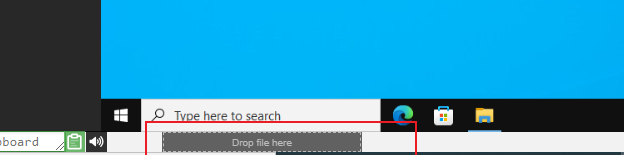
For now, you can only move one file at a time, but if you have a bunch, just zip them up and drag the archive across. The transfer breaks files into chunks so even large ones go through smoothly, and it shines on fast fiber connections. Your folder structure inside the archive stays intact.
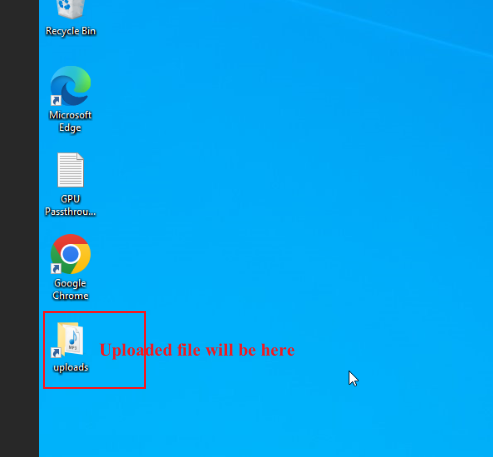
In our Linux templates, there isn't a desktop shortcut to the Uploads folder like you see on Windows. Instead, you'll find your files at:
/home/student/uploads-to-dadesktop
To recap:
OS Templates that currently have this feature enabled
- Debian 12 - v20240314 and newer
- Ubuntu 22.04 - v20240314 and newer
- Ubuntu 24.04 - v20240314 and newer
- Windows 10 - v67 and newer
OS Templates that do not have this feature enabled (as yet)
- Debian 11
- Almalinux
- Kali-linux
- Earlier versions of any template
Bear in mind, we'll be adding more to this early-access feature soon.
If you have any feedback, reach out via DaDesktop technical support chat.